About Fruit Candy Merge
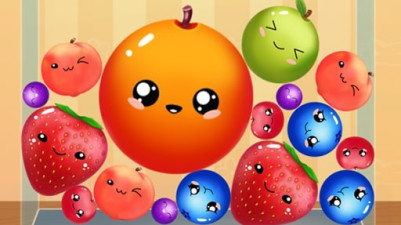
Every tap in Fruit Candy Merge is a spatial-planning decision. You aren't just dropping fruit — you're arranging a cascade of merges in a confined space. The first candy you release determines the chain reaction that follows. Place it to form a pair, or set up a future triple. When the stage gets tight, the 'Remove Smallest Item' button becomes your strategic reset, letting you prune low-value clutter to make room for high-scoring combos. Order matters from the very first drop; this is a graph of connections waiting to be solved, not a random pile of sweets.
There's something so satisfying about dropping fruit candies into the pile and watching identical ones merge into bigger, better combos. Each match clears space and racks up points, but you'll need to think ahead — when things get crowded, that 'Remove Smallest Item' button becomes your best friend. It’s a simple, colorful puzzle that hooks you with that perfect "just one more round" feeling.
How to Play Fruit Candy Merge
- Tap to drop a fruit candy from above onto the stage.
- Merge two identical candies by landing one on top of the other.
- Merging creates a new, upgraded candy and adds points to your score.
- Tap the 'Remove Smallest Item' button to delete the smallest candy currently on stage.
- Keep merging and clearing space to continue playing without the stage filling up.
Game Features
- Endless gameplay with a single, continuously filling stage.
- Candies merge into progressively larger and more valuable combos.
- The 'Remove Smallest Item' button acts as a tactical cleanup tool.
- Vibrant fruit candy graphics designed for a relaxing, casual feel.
- No timers or moves limit — you control the pace of every drop.
Tips & Strategies
- Drop new candies next to identical ones to plan ahead for a double merge.
- Use 'Remove Smallest Item' early when you see three or more tiny candies blocking space.
- Focus on merging the largest candy clusters first to maximize point gain.
- If a candy lands on a non-identical one, it stays as a separate stack — avoid piling mismatches.
- Watch the stage layout and drop candies in open gaps rather than on top of a full column.
Frequently Asked Questions
What happens when the stage is completely full?
If no space remains for a new candy drop, the game ends. You can prevent this by merging candies or using 'Remove Smallest Item' to clear space.
Can I merge more than two candies at once?
The merge rule is strictly two identical candies. Dropping a third identical candy onto a pair does not trigger a triple merge — you must merge the pair first, then drop the third onto the resulting candy.
What does the 'Remove Smallest Item' button actually delete?
It removes the single candy with the lowest merge level currently on the stage. For example, if tiny cherries are the smallest, tapping the button clears one cherry.
Do merged candies ever disappear automatically?
No, candies only leave the stage when you merge them or use the remove button. Merged candies remain and can be merged again with a matching candy of the same new type.
Is there a limit to how many times I can use the remove button?
The official instructions do not mention any limit. You can use it as often as needed during a round.
Category & Tags
Game Details
- Category: Color Sort, Object Sort
- Last updated: April 29, 2026