About Melon Drop: Fruit Merge Master
When a merge goes wrong and fruits stack too high, the game doesn't end—it offers you a lifeline. Watch an ad to shrink the pile by one fruit, buying a precious extra moment. Hints highlight the next matchable pair, and if the board dead-locks, you can restart without penalty. The undo button lets you pull back a single drop, saving you from a disastrous placement. These error-recovery tools keep the session flowing, so you can focus on chaining merges rather than sweating every drop.
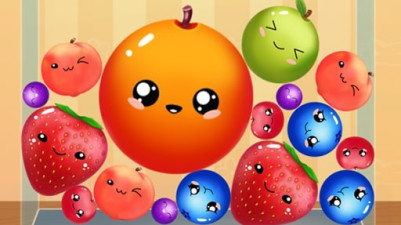
Fruit Merge: Juicy Drop Game is all about that satisfying moment when two matching fruits collide and combine into something bigger. Your goal is to keep pairing same fruits together to create the largest ones possible, all while stopping them from spilling out of the container. As they grow, space gets tight, so you'll need to think ahead. Only 1% of players have made the giant fruit — think you can pull it off?
How to Play Melon Drop: Fruit Merge Master
- Tap to drop a fruit into the container.
- Guide it to land on another fruit of the same type to merge them into a larger fruit.
- Keep merging to grow fruits from small to giant, with each merge increasing the fruit's size.
- Avoid letting fruits stack above the container's rim—if they overflow, the round ends.
Game Features
- Endless gameplay with no set levels—each session continues until the container overflows.
- Fruits evolve through multiple stages, from tiny berries to a colossal final fruit.
- Hints and undo let you correct mistakes and find merges without losing progress.
- Watch an ad to remove one fruit from the board when the pile gets too high.
Tips & Strategies
- Drop fruits onto like fruits to merge instantly—don't wait for them to settle.
- Use the undo button immediately after a bad drop to avoid crowding the container.
- Save ads for when the fruit pile is near the brim and you have no match available.
- Plan merges ahead: aim to keep the tallest fruit in the center so smaller ones can land on the sides.
Frequently Asked Questions
What happens if I let fruits overflow?
The game ends and you'll see your final fruit size. You can restart immediately or watch an ad to remove one fruit and continue.
How do I use the hint feature?
Tap the hint button (lightbulb icon) to highlight two matching fruits that can be merged next. Hints are limited per session.
Can I undo more than one drop?
Yes, you can undo multiple drops in reverse order, stepping back through each fruit you placed.
What's the biggest fruit I can create?
The game tracks up to a 'giant' fruit tier. Only 1% of players reach it, requiring precise merges and efficient board management.
Do hints or undo cost anything?
Hints are free but have a cooldown after each use. Undo is free and unlimited during a session.
Category & Tags
Game Details
- Category: Color Sort, Object Sort
- Last updated: April 29, 2026