About Merge Blocks 2048
Failure in Merge Blocks 2048 isn't a dead end — it's a reset. When the grid locks up with no merges left, the only way forward is to swipe and start over. That restart isn't defeat; it's a second chance to place every tile with sharper foresight. The recovery loop teaches you to watch for chain merges and avoid crowding high-value blocks in corners. Each failed board sharpens the spatial planning needed to reach 2048.
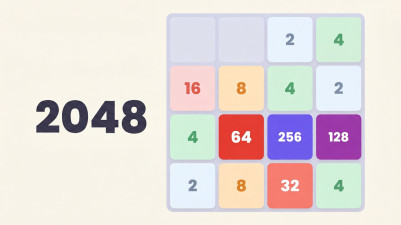
Swipe numbered tiles around a 4x4 grid, matching identical blocks to merge them into bigger numbers. Start with 2 and climb toward 2048 and beyond. Every move fills the board, so you’ve got to think ahead. Chain merges for combos and bonus coins—spend them on handy power-ups like Undo or Shuffle. It’s easy to pick up, but tough to master.
How to Play Merge Blocks 2048
- Swipe up, down, left, or right on mobile, or press Arrow keys/WASD on desktop, to slide all numbered tiles in that direction.
- When two tiles with the same number touch, they merge into one tile with the sum of their numbers.
- After each swipe, a new tile with a value of 2 or 4 appears in a random empty spot on the grid.
- Plan your moves to avoid filling the board — if no empty cells remain and no merges are possible, the game ends.
- Use the Undo button (mobile) or tap the Undo icon (desktop) to revert your last move, available for coins.
- Aim to create a tile with the number 2048 to win, then continue for higher scores.
Game Features
- Grid-based sliding merge mechanic on a 4x4 board.
- Chain multiple merges in one swipe to trigger combo bonuses and earn extra coins.
- In-game shop offers power-ups: Undo, Extra Life, Score Boost, Shuffle, and Head Start.
- Coins earned from merges and combos can buy those power-ups.
- Persistent high score tracking to measure progress across games.
Tips & Strategies
- Keep your highest tile in one corner and slide only in two directions to avoid scattering it.
- When the board gets full, use the Undo power-up to undo a bad swipe instead of restarting.
- Save coins for the Extra Life power-up — it gives you one more move after a deadlock instead of ending the game.
Frequently Asked Questions
What happens when the board fills up and no merges are possible?
The game ends immediately, and your score is recorded. You can restart from scratch or use an Extra Life power-up if you have one to undo the last move and continue.
How do I earn coins and what can I buy with them?
Coins are earned by merging tiles, especially through chain combos. In the shop, you can spend coins on Undo, Extra Life, Score Boost, Shuffle, and Head Start power-ups.
Can I undo a move if I make a mistake?
Yes, if you have an Undo power-up available. On mobile, tap the Undo button; on desktop, click the Undo icon. Each undo consumes one Undo item from your inventory.
Is there a way to win beyond reaching 2048?
Yes. Reaching 2048 is the primary goal, but you can continue playing to achieve higher tiles like 4096, 8192, or beyond, aiming for the highest possible number and a better high score.
Category & Tags
Game Details
- Category: Color Sort, Number & Letter Sort
- Last updated: June 3, 2026