About Tap It Away 3D
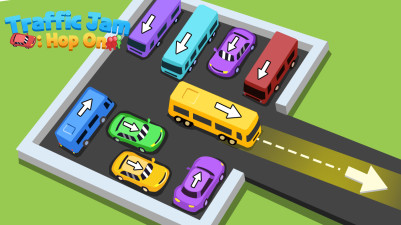
The eye reads a Tap It Away 3D board like a traffic jam at an intersection – blocks sit at cross-grid positions, each stamped with a directional arrow that points the only way it can slide. Before any finger moves, the player scans for the block whose arrow points toward an empty cell, because that is the only block that can legally move. The visual cue is the arrow itself, painted on top of the block, and the empty adjacent cell that makes it actionable. Once one block slides, new gaps open and new arrows become valid, creating a chain of movement that clears the level.
Tap It Away 3D is all about the satisfying click of sliding blocks into place. You tap arrows to shift them around, but careful planning is key—blocks can block each other, so you’ll need to think a few moves ahead. There’s no timer, just pure, stress-free sorting. It’s a clever little puzzle that feels great to solve.
How to Play Tap It Away 3D
- Swipe to rotate the entire board and view blocks from different angles.
- Tap a block to move it one step in the direction shown by its arrow.
- Blocks cannot move if another block or the board edge blocks the arrow direction.
- Clear all blocks from the board to complete the level.
Game Features
- 3D perspective allows full rotation of the puzzle board by swiping.
- Each block has a fixed arrow indicating its only legal movement direction.
- Blocks can block each other, requiring sequential moves to create space.
- No timer, enabling unlimited planning and trial-and-error.
- Clean win condition: remove every block from the board.
- Increasing difficulty as more blocks and tighter layouts appear.
Tips & Strategies
- Look for blocks whose arrow points directly into an empty cell – those are your only starting moves.
- Plan a sequence: moving one block often frees another, so trace the chain before tapping.
- Rotate the board frequently to spot gaps or blocks you missed from one angle.
- If stuck, examine which block's arrow points toward the biggest open area – that block is likely key.
Frequently Asked Questions
What happens if I tap a block that cannot move?
Nothing happens. The block will only move if its arrow points into an empty adjacent cell.
Can I move a block more than one space at a time?
No. Each tap moves the block exactly one step in the arrow direction. You must tap repeatedly to slide it across multiple cells.
How do I know if I am stuck with no possible moves?
If every remaining block has its arrow blocked by another block or the board edge, the puzzle is unsolvable from that state – you may need to restart the level.
Does rotating the board change the positions of the blocks?
No. Rotation only changes your viewing angle; the blocks and their arrows remain in place.
Is there any penalty for tapping a block that cannot move?
No penalty. The game simply ignores the tap, so you can experiment freely.
Category & Tags
Game Details
- Category: Parking Sort
- Last updated: April 26, 2026