About Cards: Klondike Solitaire
A wrong move in Klondike Solitaire doesn't trigger an immediate game over — it buries a needed card deeper, blocks a suit stack, or dead-ends the tableau. The undo button rewinds the last move, but the real recovery loop comes from restarting with the same shuffled deck. Playing the same layout a second time teaches the player which sequences were worth the risk and which openings should have been left untouched. Failure becomes a diagnostic tool, turning each restart into a sharper second attempt.
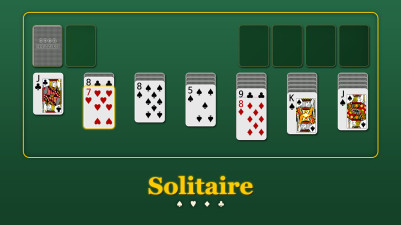
There’s something so satisfying about dragging a card into place and watching the piles grow. In this classic solitaire, you’re sorting all the cards into four stacks by suit, from Ace to King. It’s simple to pick up but quietly addictive as you plan each move. The goal is clean order, one card at a time. Perfectly relaxing.
How to Play Cards: Klondike Solitaire
- Drag a card from the tableau or waste pile to a foundation pile if it matches the suit and is the next rank in ascending order (Ace, then 2, then 3, etc.).
- Move a card or a sequence of cards in descending order and alternating colors (red on black or black on red) from one tableau column to another.
- Click or tap the stock pile to deal one card face-up onto the waste pile; you can drag that card into the tableau or onto a foundation.
- When a tableau column becomes empty, you may move any available King (or a sequence starting with a King) into that space.
- The game ends when all 52 cards are sorted into the four foundation piles, one for each suit.
Game Features
- Standard 52-card deck dealt into seven tableau columns with only the top card face-up.
- Undo button that reverses the last move, allowing recovery from accidental placements or misclicks.
- Auto-complete option that automatically moves eligible cards to the foundation piles.
- Hints system that highlights a legal move when you're stuck.
- Restart function that re-deals the same shuffled deck, letting you replay the identical layout.
Tips & Strategies
- Before moving a card into a tableau column, check whether that column's top card will block access to cards you need later.
- Use the undo button immediately after a move that buries a needed card rather than waiting several turns.
- When the stock pile runs out, flip the waste pile back to the stock pile and continue dealing.
- Prioritize revealing face-down cards in the tableau over building foundation piles early in the game.
- If you restart the same deck, note which early moves led to a dead end and try a different sequence the second time.
Frequently Asked Questions
What happens if I have no legal moves left?
If no card can be moved to the tableau or foundations and the stock pile is exhausted, the game is deadlocked. You can use the restart button to replay the same deck or start a new game.
Can I move multiple cards at once from the tableau?
Yes, you can drag an entire sequence of cards that are in descending order and alternating colors from one tableau column to another.
How do I know which suit goes on which foundation?
Each foundation pile accepts only one suit. The first card placed on a foundation determines its suit, so start with an Ace of that suit.
Does the undo button let me undo multiple moves?
The undo button reverses the most recent move only. Each click undoes one step back in your move history.
Category & Tags
Game Details
- Category: Color Sort, Number & Letter Sort
- Last updated: May 6, 2026